Managing customer communication preferences is a critical aspect of any modern loyalty program. SMS remains one of the most effective engagement channels, but it also requires strict consent handling, real-time updates, and compliance with customer opt-in and opt-out preferences.
Salesforce Loyalty Management provides a strong foundation for managing loyalty members, while webhook-based integrations enable real-time synchronization with external communication platforms. In this blog, we explore how SMS subscription events can be automatically captured and reflected in Salesforce Loyalty using Attentive webhooks—ensuring data accuracy, compliance, and customer trust.
Managing SMS Subscriptions in Salesforce Loyalty with Attentive Webhooks
Keeping customer preferences up to date is essential, especially when it comes to SMS communication. Recently, I worked on integrating Attentive with Salesforce Loyalty Management to streamline how SMS subscription events are captured and reflected in Salesforce.
In this blog, I’ll walk through how I set up webhooks in Attentive to automatically update the SMS Opt-In status of loyalty members in Salesforce Loyalty
What Was the Goal?
Whenever a loyalty program member:
- Subscribes to SMS updates
- Or Unsubscribes
I wanted that change to instantly reflect Salesforce by updating a custom field (SMS Opt-In) on the member’s contact record.
This helps ensure that our loyalty program always respects the communication preferences of each customer, without needing manual updates.
Setting Up the Webhook in Attentive
Here is how I configured things in Attentive:
- Selected the sms.subscribed (and optionally sms.unsubscribed) to trigger the webhook.
- Created a Private App in Attentive.
- Went to the Webhooks section and enabled it.
- Selected the Universal Webhook option to send selected events for all installs.
- Added my Salesforce endpoints.
- Added the Signing Key, which is used to verify incoming requests.
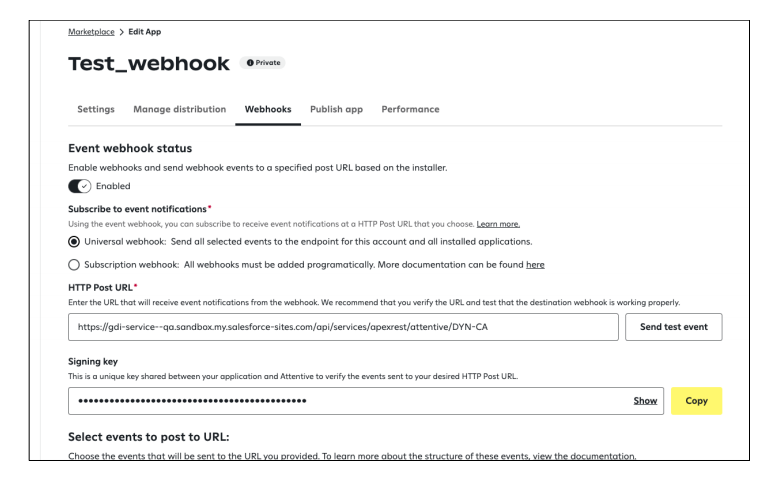
– the Signing Key, which is used to verify incoming requests
– Selected the (and optionally sms.unsubscribed)to trigger the webhook.
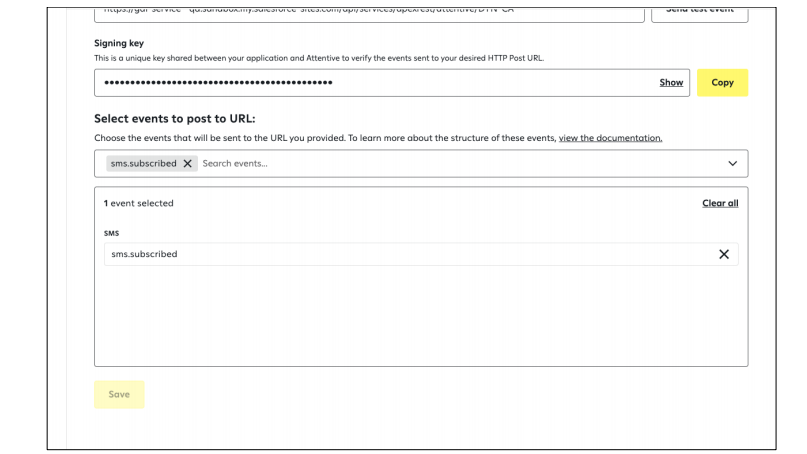
Once saved, Attentive was ready to notify Salesforce any time someone subscribed or unsubscribed from SMS.
Handling Events in Salesforce Loyalty (via Apex)
To process the incoming data, I built a lightweight Apex REST service that listens for these webhook events.
@RestResource(urlMapping='/attentive/*')
global with sharing class AttentiveWebhookHandler {
    @HttpPost
    global static void handleWebhook() {
        RestRequest req = RestContext.request;
        String payload = req.requestBody.toString();

        // (Optional) Signature validation for security
        Map<String, Object> eventData =
            (Map<String, Object>) JSON.deserializeUntyped(payload);

        String eventType = (String) eventData.get('eventType');
        Map<String, Object> user =
            (Map<String, Object>) eventData.get('user');

        String phone = (String) user.get('phone');

        if (String.isNotBlank(phone)) {
            List<Contact> matches = [
                SELECT Id, SMS_Opt_In__c
                FROM Contact
                WHERE Phone = :phone
                LIMIT 1
            ];

            if (!matches.isEmpty()) {
                Contact c = matches[0];
                c.SMS_Opt_In__c = (eventType == 'sms.subscribed');
                update c;
            }
        }
    }
}
This Apex class looks up the contact using the phone number from the webhook payload and then updates the SMS Opt-In field based on the event type
Results
Now, anytime a customer opts in or out of SMS communication through Attentive, their status is automatically updated in Salesforce Loyalty—no manual effort needed.
This setup:
- Keeps loyalty member profiles always in sync
- Respects opt-in/opt-out choices in real-time
- Improves compliance and customer trust
Why Real-Time SMS Sync Matters in Loyalty Programs
SMS consent is not static. Customers frequently opt in, opt out, or change phone numbers. Without real-time updates, loyalty teams risk:
- Sending messages to unsubscribed users
- Violating communication consent policies
- Damaging customer trust
- Introducing data mismatches across systems
Webhook-driven updates eliminate these risks by ensuring Salesforce Loyalty always reflects the latest subscription state.
How Webhooks Improve Automation and Accuracy
Webhooks act as event-driven messengers. Instead of polling for changes or relying on batch jobs, Salesforce is notified immediately when a customer’s SMS preference changes.
This approach delivers:
- Instant data synchronization
- Reduced operational overhead
- Higher system reliability
- Better customer experience
Best Practices for SMS Subscription Handling
To strengthen this integration further, consider the following best practices:
- Store opt-in timestamp and source for auditing
- Validate webhook signatures for security
- Handle resubscription scenarios gracefully
- Add logging for webhook failures
- Use consistent phone number formatting
These steps help future-proof the integration and improve maintainability.
Compliance and Trust Considerations
Accurate SMS consent tracking is not only a technical requirement but also a trust and compliance necessity. Automated updates ensure customers always receive messages aligned with their preferences, reinforcing transparency and brand credibility.
Conclusion
This webhook-based integration between Attentive and Salesforce Loyalty Management demonstrates a clean, efficient way to manage SMS subscription events in real time. By automatically updating the SMS Opt-In status on loyalty member records, organizations eliminate manual effort, improve compliance, and maintain accurate customer profiles.
For loyalty programs that rely heavily on SMS engagement, this approach provides a scalable, reliable foundation for respectful and effective customer communication.